Zachary W. Huang
Quartus Prime is Horrendous
Mar 26, 2026
As someone who cares about software, I am just absolutely flabbergasted by how user-unfriendly some modern hardware tooling is. I’m not talking about GHDL or Verilator or yosys - those are awesome projects clearly made with a lot of love - I’m talking about Quartus Prime, an IDE for hardware design made by Altera, previously known as Intel Quartus Prime, and Altera Quartus Prime before that, and Altera Quartus II before that. The reason for these name changes, by the way, is that Intel bought out Altera in 2015, but then Altera became independent again in 2025 after being bought out by a private equity firm, which gives you a hint as to the corporate shenanigans behind the scenes. And so as you might expect, Quartus Prime is unmistakably “enterprise software”, which I hereby define as “the worst possible implementation of a program that still (mostly) functions”. Now why do I say this?
A Case Study
Suppose I want to accomplish a simple task. I want to testbench the Altera floating-point IP (e.g. “library” in the language of computer science) so that I can use it in my project that requires floating point computation.
Since this IP is proprietary, we don’t get access to the implementation. Instead, we use the built-in MegaWizard to generate an interface we can use in our own design. Ok, sure. Ignoring the fact that the GUI looks straight out of the early 2000s, and that we can only generate one distinct floating-point operation at a time, this is fine.
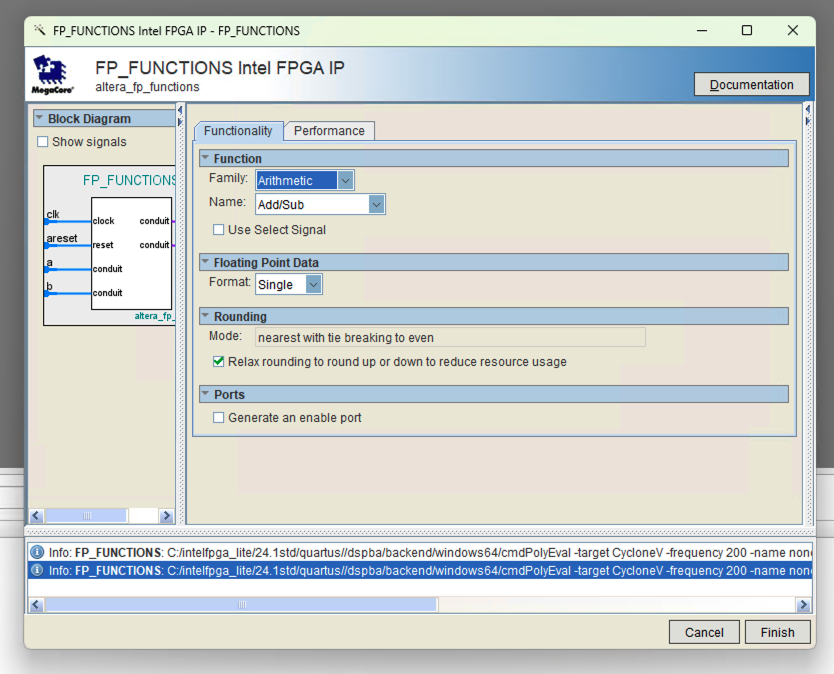 Generating an adder/subtractor IP
Now, we write a simple testbench in VHDL that instantiates this unit, feeds in some inputs, and logs the outputs. This is the interface for the floating-point adder/subtractor IP.
library ieee;
use ieee.std_logic_1164.all;
use ieee.numeric_std.all;

entity fp_addsub is
	port (
		clk    : in  std_logic                     := '0';             -- clock
		areset : in  std_logic                     := '0';             -- reset
		a      : in  std_logic_vector(31 downto 0) := (others => '0'); -- operand A
		b      : in  std_logic_vector(31 downto 0) := (others => '0'); -- operand B
		q      : out std_logic_vector(31 downto 0);                    -- sum (pipelined)
		s      : out std_logic_vector(31 downto 0)                     -- difference (pipelined)
	);
end entity fp_addsub;
Then, we’ll write a quick testbench so we can verify that the latency is 11 clocks, as we expect from the documentation.
library ieee;
use ieee.std_logic_1164.all;
use ieee.math_real.all;
use ieee.float_pkg.all;

entity fpu_test_tb is
end entity;

architecture sim of fpu_test_tb is
    signal clk : std_logic := '0';
    signal areset : std_logic := '1';
    signal a_in, b_in, q_out, s_out : std_logic_vector(31 downto 0) := (others => '0');

begin
    -- instantiate unit under test
    UUT: entity work.fp_addsub
        port map (clk => clk, areset => areset, a => a_in, b => b_in, q => q_out, s => s_out);

    clk <= not clk after 10 ns;

    stim_proc: process
    begin
        -- Reset and Initialize
        areset <= '1'; wait for 20 ns;
        areset <= '0'; wait until rising_edge(clk);

        -- Set Inputs
        a_in <= to_slv(to_float(12.5));
        b_in <= to_slv(to_float(7.25));

        -- Monitor loop
        for i in 1 to 15 loop
            wait until rising_edge(clk);
            report "Cycle " & to_string(i) &
                   " | A: " & to_string(to_real(to_float(a_in))) & " B: " & to_string(to_real(to_float(b_in))) &
                   " | Q: " & to_string(to_real(to_float(q_out))) & " S: " & to_string(to_real(to_float(s_out)));
        end loop;

        report "Simulation Finished";
        wait;
    end process;
end architecture;
Disregarding the eyesore that is the VHDL language, this again seems alright.
In fact, given a behavioral model for fp_addsub, this would run perfectly fine using GHDL (I checked).
You would expect it to “just work” with Quartus Prime, right?
Roadblock 1
“Design library ‘ieee’ does not contain primary unit ‘float_pkg’.”
~Quartus Prime 24.1
Ok. The VHDL language-level floating-point library doesn’t work. So I have a component that takes in 32-bit values and outputs 32-bit values, but I can’t interact with these as actual numbers. As it turns out, this library is defined in the 2008 version of the VHDL standard, but is not supported in the Lite (free) version of Quartus Prime [1].
You need the Pro version of Quartus Prime. To use floating-point values in VHDL.
 :facepalm:
Even though it has been nearly two decades since the creation of VHDL-2008 (it’s in the name), I’m only allowed to use VHDL-1993 in the free version of Quartus Prime. Even the greyest-bearded C programmers still usually at least use the C99 standard, but I guess hardware developers are still stuck half a decade behind that.
Luckily, some kind souls have implemented VHDL-1993-compatible version of the “new” floating-point libraries, so I’m saved for now [2]. I dropped it into the project, and after dealing with some library definition issues, it works.
Roadblock 2
“Object ‘to_string’ is used but not declared in testbench.”
~Quartus Prime 24.1
Rats! Fool me twice, shame on me.
As it turns out, the to_string function, used to, you know, convert objects to strings so they can be printed out, is a fresh, bleeding-edge addition in the VHDL-2008 standard.
Which again, is not supported [3].
Just to harp on this a little more, it turns out that VHDL-2008 was supported previously in the Lite edition of Quartus Prime, but this was removed by Intel in 2020 [4]. Oh, and if you weren’t aware, Quartus Prime Standard/Pro costs only a mere $3,645 per year [5]. Amazing.
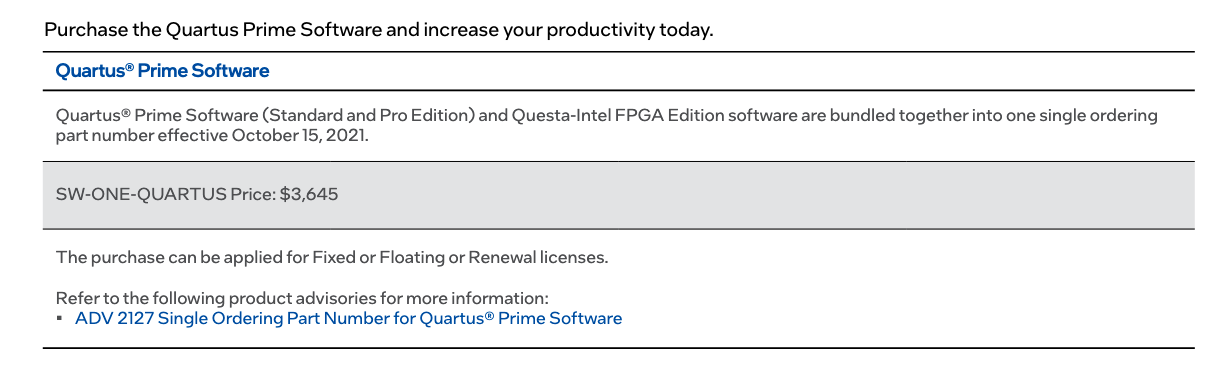 My productivity will not be increasing.
Imagine if Python moved the str function and the entire float class behind a $3,645 yearly subscription.
There would be riots.
Oh well.
I guess all I can do is curse Intel and flip back through the VHDL-1993 standard to see what I should use instead.
Oh wait, I forgot, that costs $186 [6].
Thanks, IEEE Standards Association.
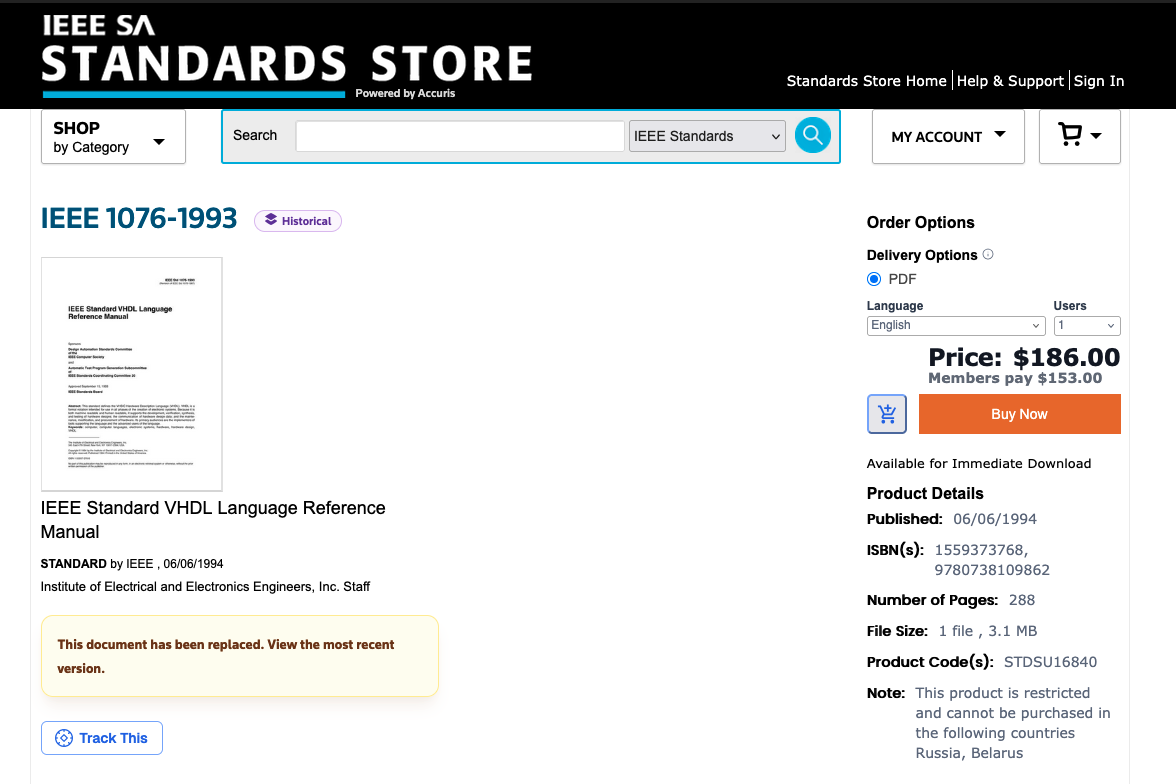 Maybe I should have learned Verilog instead...
With some help from Gemini, I translated my code so that it used the std.textio library, which forces you to manually write values into linebuffers and flush them to be output.
Whatever, it’s fine, I’ll probably be debugging using waveforms, so maybe printing won’t be very useful anyway.
I updated my code and recompiled.
And it worked!
Now, to simulate the testbench.
I clicked on “RTL Simulation” and…
Roadblock 3
“Unable to checkout a license. Make sure your license file environment variable is set correctly and then run ‘lmutil lmdiag’ to diagnose the problem.”
~Questa*– FPGA Starter Edition 24.1
As it turns out, even though Quartus Prime Lite does not require a license, the simulator it comes with, called Questa, does. The Questa Starter Edition is free, but you have to request a free 12-month license and install it. Conveniently, there’s a button in Quartus Prime that automates the process of obtaining this license!
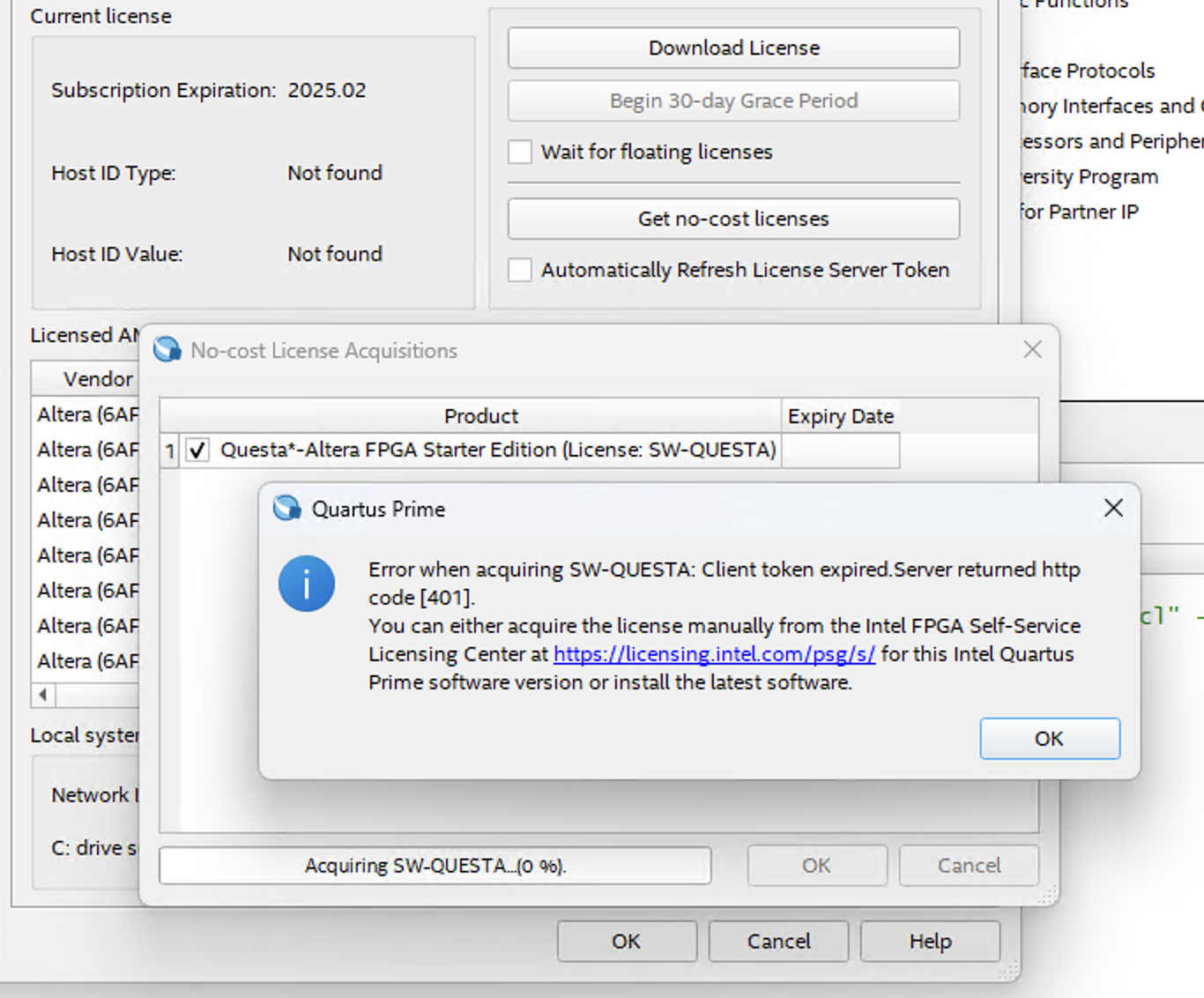 you had one job
Oh, except that it doesn’t work.
So now I need to make an account for the Altera Self Service Licensing Center (SSLC), verify my email, log in, add my MAC address, generate the license, receive it by email, download it to my computer, and then add a system environment variable pointing to it. It’s a mouthful, but luckily everything becomes clear as mud with this ridiculously verbose tutorial from Altera.
I’ve done everything asked of me, Altera. Can the software finally work now?
Roadblock 4
“Error: Failure to checkout ‘intelqsimstarter’ license feature. Feature start date is in the future.”
~Questa*– FPGA Starter Edition 24.1
???????
What do you mean?????
On the bright side, Questa finally launched successfully for the first time. On the other hand, it displayed this absolutely absurd error message in the console before promptly closing.
Alright, I guess it’s time to do some more sleuthing.
Searching online doesn’t reveal anything useful.
Guess it’s time to figure out how software licenses work.
Opening up the license.dat file shows that it’s just plaintext.
Here’s what we see (slightly redacted):
# Altera Corporation Software and/or Intellectual Property License File - PROD
# Issued 26 March 2026
# Upgrade to these products will no longer be available after the Maintenance Expiration
# date unless licenses are renewed.
# Fixed Node License
# Primary Machine Name-<REDACTED>
# Primary Machine ID-NIC ID <REDACTED>
# Companion ID-N/A
# Companion ID 2-N/A
# Product License Summary:
# 3 Questa*- FPGA Starter Edition (License: SW-QUESTA), 1 Seat(s)
# - Maintenance Expiration of 2027.03
# - License Expires 26-Mar-2027
################################################################################
# FEATURE START
# This is license file for Questasim*-FPGA Starter Edition
# Number of seat licenses is 1
# License Expires 26-Mar-2027
DAEMON mgcld path_to_mgcld
INCREMENT intelqsimstarter mgcld 2027.01 26-mar-2027 uncounted \
  <REDACTED>
# FEATURE END
################################################################################
# End of Altera Corporation Software and/or Intellectual Property License File - PROD. Issued 03/26/2026
It appears to mostly be commented out, and the uncommented parts are essentially just a hex string used to, presumably, verify that I obtained the license in a valid manner.
But something seems wrong.
The commented out portion clearly says Issued 26 March 2026.
I look at the bottom right corner of my desktop.
It’s March 25th.
 I have no words
Presumably, the software developers at Altera don’t understand timezones. Or more specifically, they don’t understand that multiple places on Earth may have different dates at the same time. It can be March 25th in sunny Pasadena and March 26th in London. That’s not a software bug, that’s just common sense.
So presumably, the licensing server generated a 12-month license starting at its local time, which happened to be March 26th, before sending it back through time to poor me, stuck in March 25th. But the license is only valid from March 26 onwards, so Questa can’t verify it. I can’t even be bothered anymore. It was already past 11pm, so I just watched some YouTube until the clock struck midnight.
After the date became March 26th, I tried yet again to start Questa. Again, it opened! But I was greeted with yet another cryptic error message.
Roadblock 5
“Cannot checkout an uncounted license within a Windows Terminal Services guest session.”
~Questa*– FPGA Starter Edition 24.1
Oh lord, what is it now?
A quick google search reveals that… I’m not allowed to use the software in an instance of Remote Desktop [7].
 ...
...For context, my daily driver is a Macbook Pro. I have a mini PC I keep on my desk for Windows-only applications, and I remote into it since Microsoft Remote Desktop is surprisingly good, and so I don’t have to keep a second monitor/keyboard/mouse just for when I need to use it.
At this point, I was in too deep. I’m not going to let some random product manager behind the scenes determine what I can and can’t do with the hardware I own. I had previously generated a “Fixed” license for Questa, which is a simple drag-and-drop license you point your application to. But remote desktop access is allowed under the “Floating” license, which is a license that you must host using a FlexNet Licensing server, and which Questa queries at runtime to check if it can “checkout” the license [7]. So now, I need to download a licensing server to host a license on my computer so that I can validate the license on the same computer so I can use Questa from a remote desktop.
Ok, so now I’ve cycled back to Roadblock 3.
I went back to the Altera SSLC, generated a floating license for Questa, then downloaded the Altera FlexLM license server, then set my environment variables, created a service using the lmtools.exe GUI, started the server, opened Questa, and…
“Unable to checkout a license. Make sure your license file environment variable is set correctly and then run ‘lmutil lmdiag’ to diagnose the problem.”
~Questa*– FPGA Starter Edition 24.1
It doesn’t work. After another couple additional hours of deskpalm-ing, searching online, modifying environment variables, digging into logs, and editing license files by hand, I realize that I had fallen for one of the classic blunders. Instead of downloading the aptly named Flexlm License Daemon v11.19.6.0 for FPGA software, I should have scrolled down more to find the Flexlm License Daemon v11.19.5.0 for Siemens ModelSim/Questa FPGA software [8]. Right. Because obviously the term “FPGA Software” does not include “FPGA Simulation Software”, which is what exactly what Questa is.
I don’t even have any more good facepalm images to add to this blog post.
So I downloaded the Siemens (god knows why Siemens is involved in this) license daemon, manually added my PC’s own host name to the license dat file, installed the license server service, started it, changed the environment variables to point to the license it’s hosting, and finally… it worked.
Well, Questa couldn’t properly compile my testbench so I had to fix some more bugs. Basically, Quartus failed to notify Questa of some external library I had in my project (namely, the drop-in floating point library from earlier), so I had to manually re-compile the library in Questa to make it available to my testbench, and only then, after this ridiculous wild goose chase, it finally worked.
I’m greeted with a GUI filled with buttons, toolbars, panels, all the graphical widgets you could imagine if you were a Windows frontend designer in 2000.
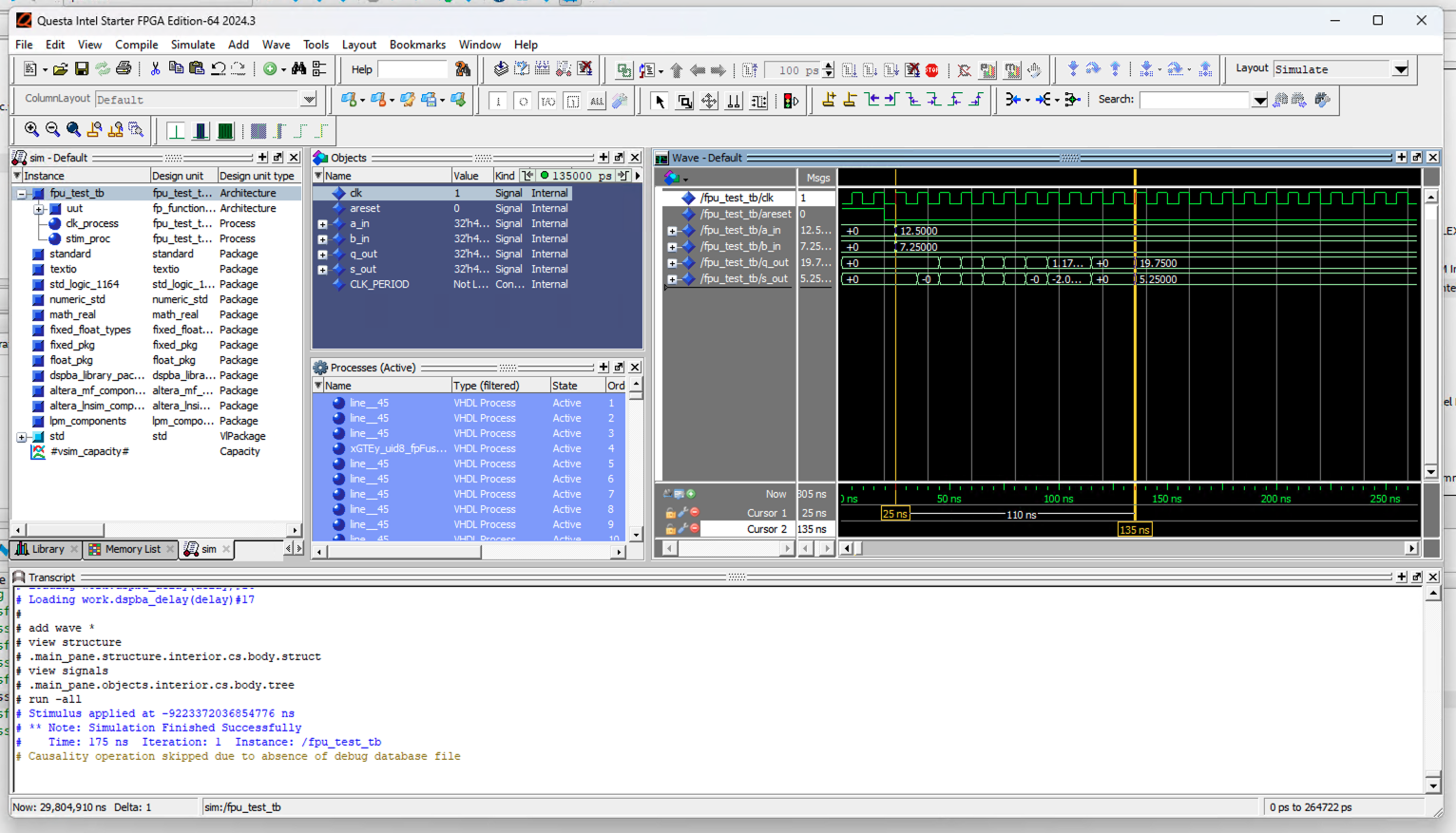 how gorgeous /s
It’s amazing… I especially love the little buttons in the toolbar with graphics that don’t tell you anything about what they do. It’s like being in a candy shop - just try pressing it and see what happens! (I’m being sarcastic by the way, this UI is horrendous).
But what I actually care about, the waveform, is truly a beauty to behold.
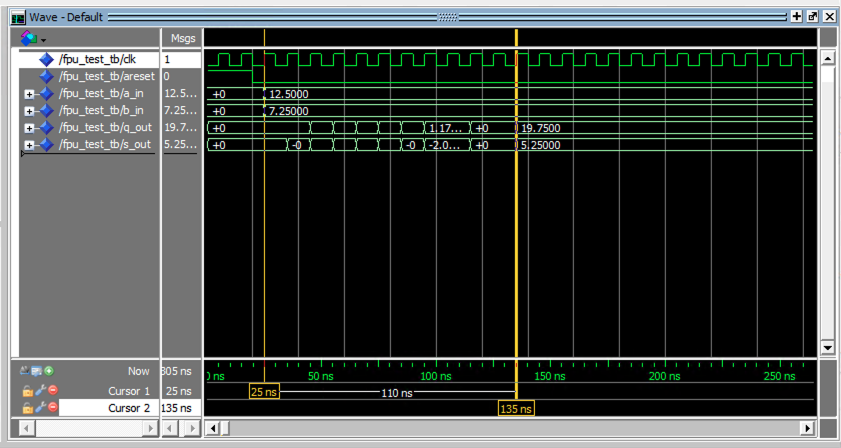 how gorgeous
Finally, we get the point of this whole adventure. We can see in the waveform that at time ns, we clock in the inputs and into the floating-point adder/subtractor, and exactly 11 clocks later, at time ns, the sum and difference are clocked out as and , respectively. So the floating-point IP works, exactly as advertised, and I can now simulate the rest of my design exactly as it will run on the FPGA.
Conclusion
It’s now about 6am, about 8 hours since I started, and I finally accomplished the very first task that I thought would take an hour max. I don’t even really know how to feel right now. All I can really think about is the philosophy of Worse is Better, but that’s just kind of sad, you know? We can do better than this, right? Software is meant to make our lives easier. But this is really the state of the art in hardware tooling?
I just wanted to simulate my design, and instead I’m dealing with corporate BS, licensing issues, and just stuff that is genuinely a waste of time. I really want to make an open-source alternative that is easier to use, faster, and better in every way than Quartus and Questa combined so that they will eventually become deprecated and never to be used again, like how the proprietary AT&T Unix was superceded in every possible way by the open-source Linux. (Well, some open-source alternatives already exist, mostly for simulation, but synthesizing for Cyclone V is still a little difficult without Quartus.)
Well, this was my method of catharsis, documenting my struggles so maybe others will learn from my mistakes. TLDR, avoid Quartus at all costs.
P.S.
I went back and repeated the entire process with GHDL, creating a simple simulation model of a pipelined floating-point adder-subtractor, and testbenching it. All I did was copy in the interface from before, implement it, and run the test bench as is, and I get:
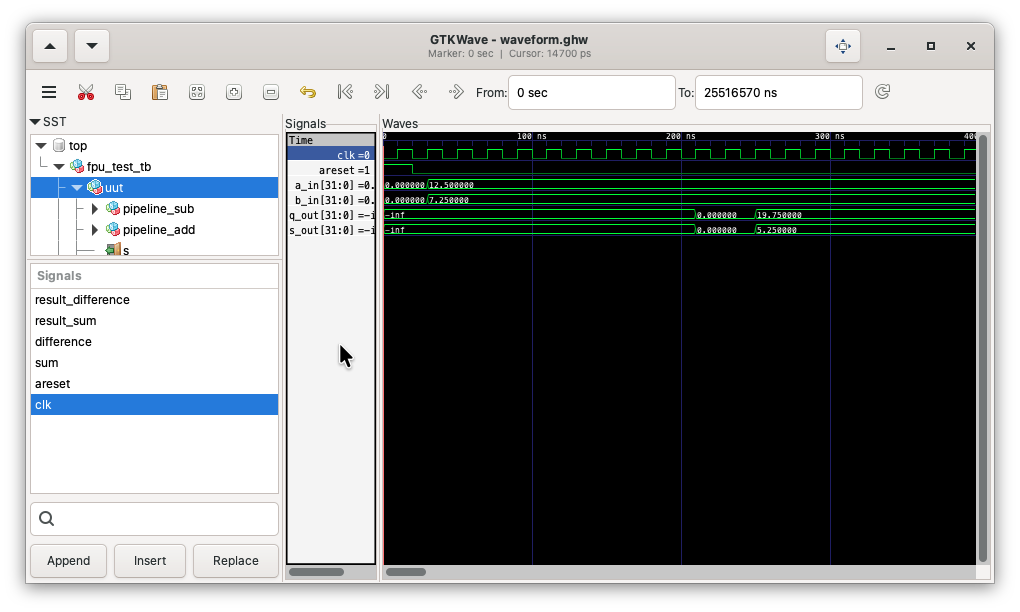 viewing the results with gtkwave
So much easier. And the same exact waveform. Now I just need to figure out how to increase the font size.


Zachary W. Huang © 2021-2026